SendCopy.ai offers different plans based on the number of LinkedIn sender accounts and the scale of your outreach operation.
Your plan determines the number of sender seats available and the features designed for individual users, growing teams, and agencies.
Important: Pricing and plan features can change. Always use the current SendCopy.ai pricing page as the final source of truth when publishing or updating this article.
The current public pricing structure includes:
Annual pricing is shown as a lower effective monthly rate when billed annually.
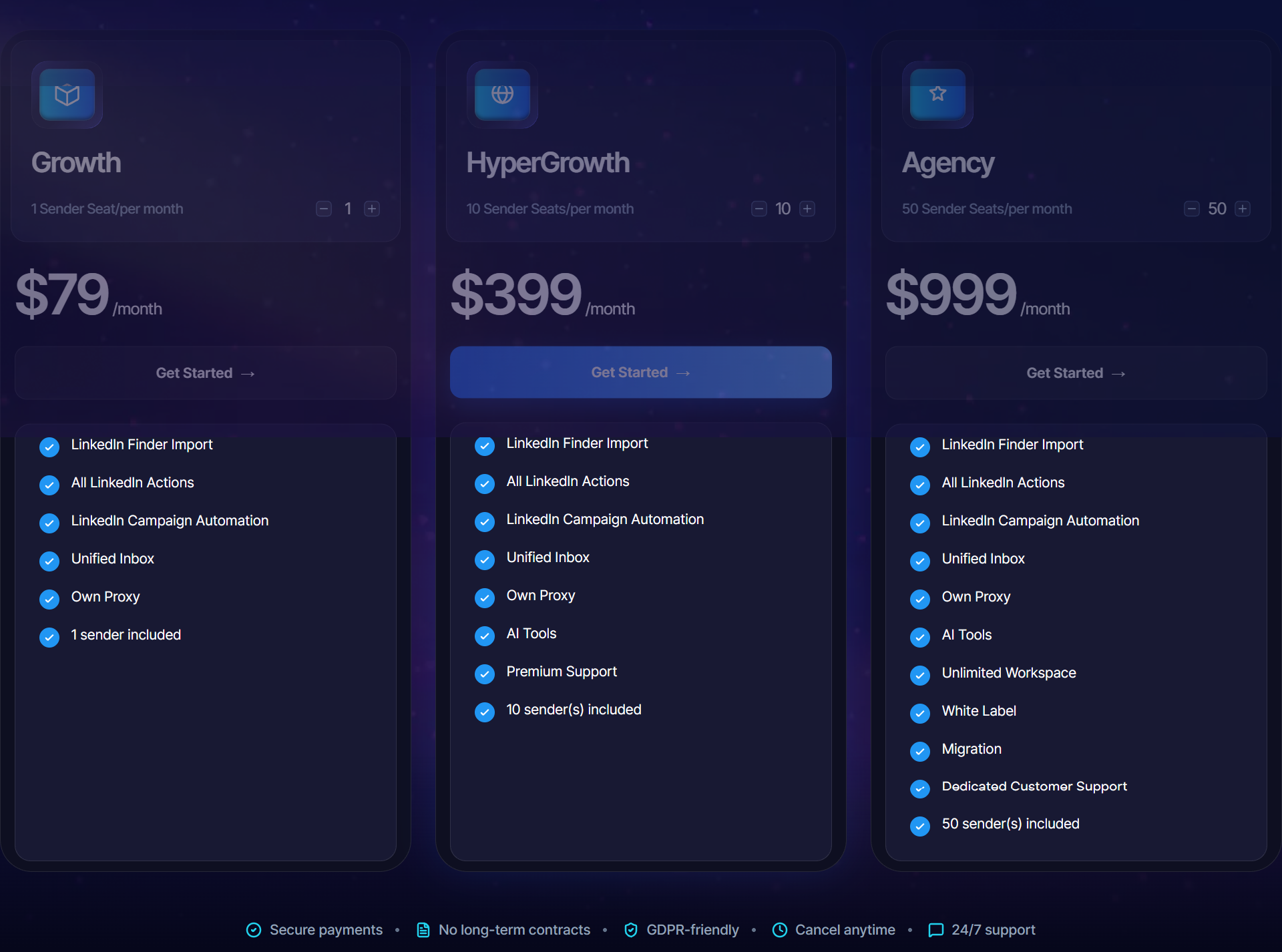
Note: Replace the pricing table above if SendCopy's public pricing changes.
A sender seat represents a LinkedIn account that can be connected to SendCopy and used for outreach.
For example:
1 sender seat = one LinkedIn sender
10 sender seats = up to ten LinkedIn senders
50 sender seats = up to fifty LinkedIn senders
Sender capacity is particularly important for teams and agencies managing outreach from multiple LinkedIn accounts.
The Growth plan is designed for users who need a single LinkedIn sender.
It can be suitable for:
Founders
Individual sales professionals
Recruiters
Consultants
Individual marketers
Choose this plan if you are managing your own outreach and only need one sender.
HyperGrowth is designed for larger outreach operations requiring multiple LinkedIn senders.
With multiple sender seats, teams can distribute campaigns across different accounts and manage larger outreach operations.
It can be useful for:
Sales teams
Business development teams
Lead-generation teams
Growing outreach operations
The Agency plan is designed for agencies managing multiple senders and clients.
It provides significantly more sender capacity and is intended for larger-scale operations.
It can be suitable for agencies that need to manage:
Multiple clients
Multiple LinkedIn accounts
Multiple campaigns
Team members
Client-specific workflows
See Setting Up Client Workspaces for Agencies for more information.
SendCopy currently advertises a 3-day free trial.
The trial allows you to explore the platform before committing to a paid subscription.
Yes. SendCopy's public pricing information states that there are no long-term contracts and that users can cancel.
Before cancelling, make sure you understand the current cancellation and refund terms shown in your account and on SendCopy's official billing information.
For step-by-step instructions, see Cancelling Your Subscription.
If you need more sender capacity than your current plan provides, check the current SendCopy billing options for available additional-seat options or contact support.
Before adding more senders, consider:
How many accounts you actively need
How many campaigns you will run
How your team will manage conversations
Whether your current plan already provides enough capacity
See How to Add Additional LinkedIn Seats.
Tips
• Choose your plan based on the number of active senders you actually need.
• Don't purchase additional capacity before you have a clear operational need.
• Review the current pricing page before upgrading.
• Remember that sender seats and team members are different.
• If you're an agency, plan your client and sender structure before scaling.
Ask yourself:
How many LinkedIn accounts will actively send outreach?
If you only need one, a single-sender plan may be enough.
If you're managing multiple senders or clients, a higher-capacity plan may make more sense.
If you're still unsure, contact SendCopy Support with your expected number of senders and users.
Understanding SendCopy Plans, Pricing, and Sender Seats
How to Upgrade or Downgrade Your SendCopy Plan
How to Add Additional LinkedIn Seats
Free Trial, Billing, and Cancellation: What to Expect
Setting Up Client Workspaces for Agencies
