Welcome to SendCopy.ai!
If you're opening SendCopy.ai for the first time, this guide will help you understand how the platform is organized and how the main areas work together.
You don't need to learn every feature before getting started. Once you understand the basic workflow, you can jump into the detailed guide for the task you want to complete.
SendCopy.ai brings your LinkedIn outreach workflow into one place. At a high level, the workflow is: Connect a LinkedIn account → set up a Sender → manage leads → create a campaign → run outreach → manage replies → track results.
Dashboard - Get a quick overview of outreach activity.
Analytics - Review campaign and Sender performance.
LinkedIn - Connect and manage the LinkedIn accounts you use for outreach. Use connected LinkedIn accounts as Senders in campaigns.
Network - Manage and organize the prospects and connections you want to reach.
Leads - Organize the prospects you want to reach.
Campaigns - Create and manage outreach campaigns and sequences.
Omnibox - Manage conversations and replies in one place.
Settings - Manage your account and platform configuration.
The main navigation gives you access to the core areas of the platform. Your available options may vary depending on your account, plan, and permissions.
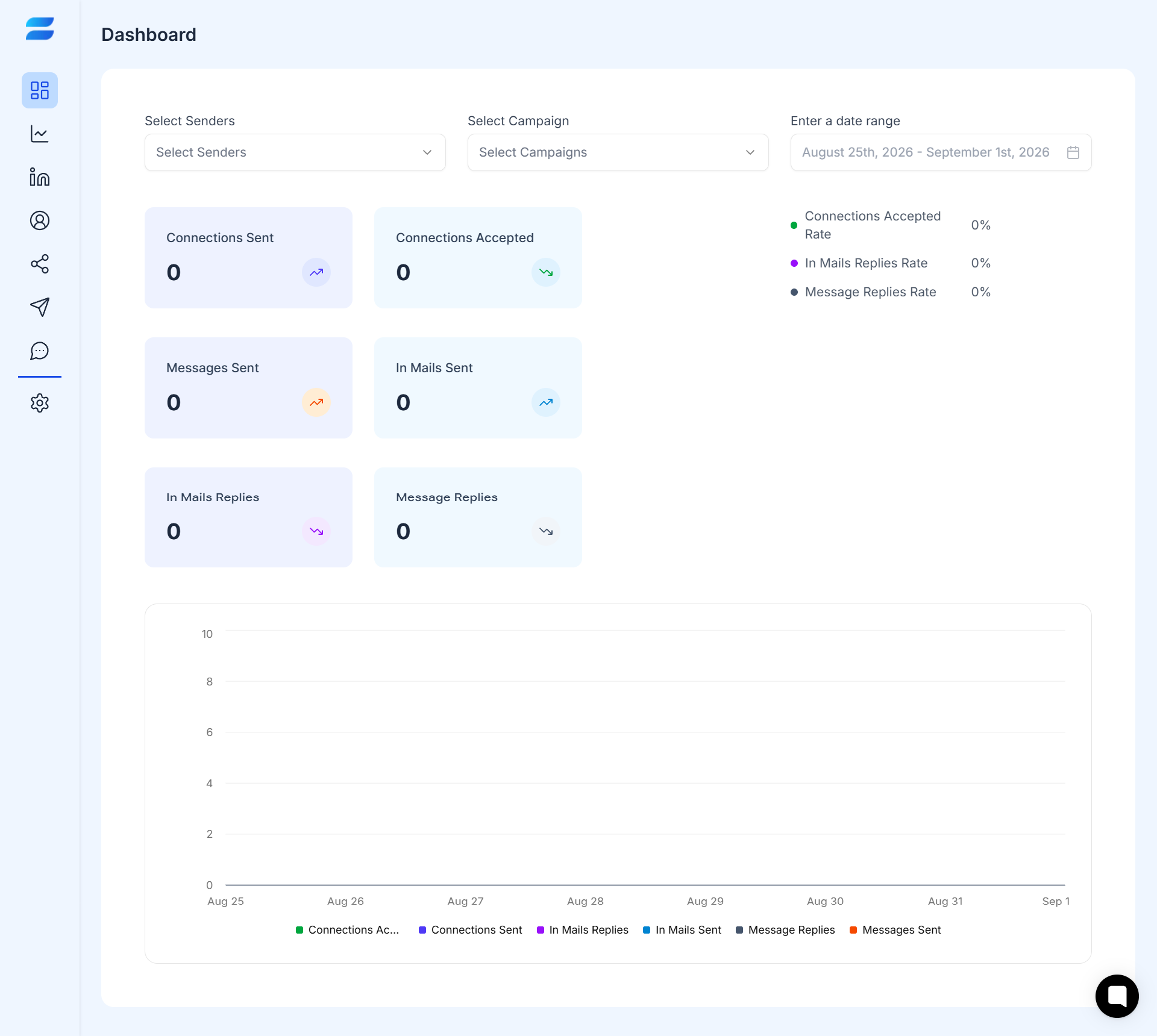
The Dashboard gives you a quick overview of your outreach activity.
From here, you can review key activity and performance metrics and filter the information based on available options such as Sender, Campaign, and date range.
Use the Dashboard when you want a quick answer to questions like:
How much outreach have I sent?
How many connections were accepted?
How many messages were sent?
How many replies did I receive?
How is my outreach performing over a specific period?
Think of the Dashboard as your high-level overview.
Analytics provides a deeper view of campaign and Sender performance. While the Dashboard is designed for a quick overview, Analytics is where you can look more closely at activity and results.
Use it when you want to look beyond the quick overview and understand activity and results in more detail.
Think of Analytics as your performance view.
LinkedIn is where you connect and manage the LinkedIn accounts used with SendCopy.ai. You can review account status and available sending limits. A connected account can be used as a Sender when it is added to a campaign.
Think of LinkedIn as the place where your LinkedIn accounts are managed.
Leads is where you organize the prospects you want to contact. Lists make it easier to keep prospects grouped and select the right audience for a campaign.
The Network section is where you manage the people you want to reach through your outreach. This is where you can organize and work with your prospects and connections before using them in your campaigns.
Keeping your prospects organized makes it easier to build targeted campaigns and reach the right audience.
Think of Network as your prospect workspace.
Campaigns are where you create and manage outreach. A campaign brings together the key parts of your outreach, including the prospects you want to contact, the LinkedIn account you're using, and the outreach sequence.
This is where your outreach moves from preparation to execution.
Think of Campaign as the engine that runs your outreach.
Omnibox gives you one centralized place to manage conversations and replies generated through your outreach.
Instead of managing conversations across different places, Omnibox brings your outreach conversations together so you can review and respond more efficiently.
Think of Omnibox as your conversation inbox.
Profile and Settings contain account and platform configuration options. The options available to you may depend on your plan and permissions.
A Sender is a connected LinkedIn account that is used to send outreach through a campaign. Your LinkedIn account is managed under LinkedIn Accounts; when you use that account in a campaign, it acts as a Sender.
1. Connect your LinkedIn account.
2. Set up and review your Sender.
3. Add and organize your leads.
4. Create a campaign and outreach sequence.
5. Run your outreach.
6. Monitor activity from the Dashboard.
7. Manage replies in Unibox.
8. Review performance in Analytics.
If you're completely new to SendCopy.ai, follow the Getting Started collection in order. Start with registration, connect your LinkedIn account, understand Senders, prepare your leads, create your first campaign, and then use the Dashboard, Unibox, and Analytics to monitor your activity.
TIP: Use this article as your map of SendCopy.ai. You do not need to learn every feature before starting - follow the Getting Started collection in order and open the detailed guide when you are ready to perform a task.
